Have you ever zoomed way in on a company logo — maybe on a website, business card, or even a huge truck graphic — and noticed it still looked perfectly crisp? No blurry edges,
No pixel blocks. Just clean, smooth lines.
That’s a clear sign you’re looking at a vector logo.
But what is vector logo? And why does everyone from designers to print shops keep asking for "vector files"?
Simply put: vector logos are built with math, not pixels. That's why they can scale infinitely without losing quality — and why they're essential for everything from business cards to billboard ads.
This guide explains everything in plain language — no design degree required.
The Simple Explanation of Vector Logo
A vector logo is an image created using mathematical equations rather than pixels.
Most images you see every day-photos, screenshots, memes are raster images. They’re made from thousands of tiny colored squares called pixels. When you enlarge them, those pixels become visible, causing blur and jagged edges.
A vector image works differently. They are built from:
Because everything is described mathematically, the computer can recalculate and redraw the image perfectly at any size — from a 16×16 favicon to a 20-foot billboard.
Think of it this way:
That's why vector logos are the gold standard for professional branding.
Vector vs Raster: The Key Differences
Let’s make it crystal clear with a side-by-side comparison:
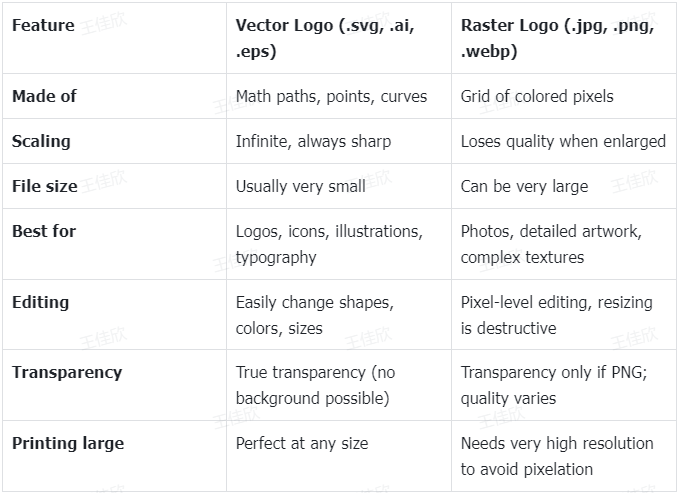
Real-world example 1 You design a logo for your coffee shop. You make it as a 2000×2000 px PNG. It looks great on Instagram. But when the sign company tries to print it 6 feet wide for your storefront, it looks fuzzy and low-res.
Same logo saved as .SVG? The printer can scale it up perfectly — every curve and letter stays sharp.
Real-world example 2 You create a T-shirt design with your podcast logo. Screen printers need a vector file so they can resize it for different shirt sizes without losing detail. A raster file would force them to guess resolution and often leads to poor results.
7 Real Reasons Businesses Choose Vector Logos in 2026
Here are the most practical benefits — the reasons why almost every serious brand insists on vector files:
•Infinite scalability One single file works everywhere: tiny social media icons, medium business cards, large banners, huge vehicle graphics. No need to maintain multiple versions.
•Always sharp & professional No jagged edges, no pixelation — even on 4K/8K screens, retina displays, or massive printed signage.
•Very small file size Vector files are usually tiny compared to high-res raster files. This means faster website loading, smaller email attachments, and easier sharing.
•Easy color changes Want to make your logo black for dark mode, gold for premium packaging, or white for dark apparel? In vector software, you can change colors in seconds without quality loss.
•Perfect transparency Vector logos can have completely transparent backgrounds — ideal for placing over photos, colored backgrounds, or fabric patterns.
•Future-proof As screen resolutions keep increasing, vector files will continue to look perfect. Raster files may need to be remade.
•Professional industry standard Printing companies, embroidery shops, sign makers, promotional product vendors, and most web developers expect (and often require) vector files. Sending raster files can cause delays or extra fees.
The Most Common Vector Logo File Formats
Here’s the practical rundown of what you’ll encounter most often:
What Format Should a Logo Be Saved In?
Quick answer: Ask for .SVG first — it's the most versatile and future-proof option right now. But the best format depends on how you'll use it.
1.For your website or app
2.For social media or digital ads
3.For print materials (business cards, brochures, posters)
4.For professional editing or future changes
5.For client delivery or presentation
6.For email signatures or quick sharing
•Save as: .PNG (72-150 DPI, small file size)
•Why: Universally compatible, won't break email formatting.
•Size: Keep it under 50KB if possible.
Pro tip: Most design tools can export to multiple formats, so you're not locked into one. When in doubt, ask your vendor or developer which format they prefer.
Where Are Vector Logos Actually Used in Real Life?
Here are the most common situations where vector format is either required or strongly preferred:
Bottom line: If the logo needs to appear in more than one size — especially very large or very small — vector is almost always the right choice.
How to Get a Vector Logo ? (Beginner-Friendly Options)
There are several realistic paths, depending on your budget, time, and design skill level.
Option 1: Hire a professional designer
Most expensive (usually $300–$3000+), but you get fully custom, high-end work with all source files (.ai, .svg) and brand guidelines. Best for established businesses or premium brands.
Option 2: Learn vector design software yourself
Great if you enjoy learning and want full control — but there’s a significant learning curve for beginners.
Option 3: Use modern AI logo generators
This is the path exploding in popularity in 2026, especially among entrepreneurs, creators, freelancers, and small business owners who don't have $1000+ to spend on design.
You can create stunning logos from text prompts or by uploading an image, making the design process faster and easier.
Best Beginner-Friendly Option: AI Logo Generators (Sologo.AI Example)
If you’re starting from zero design experience and want a eye-catching logo fast without breaking the bank, AI logo makers are now good enough to be a serious option.
One tool that consistently gets strong feedback from beginners is Sologo.AI.
Here’s what makes it different from general AI image generators:
Of course, it’s not going to produce the same level of creativity and nuance as a top-tier human designer working on a $5000+ brand identity project.
But for:
Sologo.AI (and similar dedicated logo AI tools) often delivers excellent value — professional-enough results in minutes instead of weeks and thousands of dollars.
Final Thoughts
So, what is vector logo?
It's simply the most practical, professional, and future-proof format for any brand mark you plan to use across different sizes and mediums — from a 32×32 favicon to a 30-foot trade show backdrop.
If you're just starting out, don't have design experience, and don't want to spend hundreds or thousands on a custom designer right away, you don't have to. Best AI logo generators can give you clean, vector-ready logos in minutes — often good enough to start using immediately or to hand to a designer for minor polish.
Want to see for yourself?
Pick a logo-focused AI tool, type in your brand name and a few style words (minimal, modern, vintage, bold, etc.), and generate a few concepts. Download the .SVG version and test how it looks at different sizes.
Most people are surprised at how professional and usable the result can be — and how much time, stress, and money it saves when you're just getting started.
FAQ – What People Usually Ask About Vector Logos
Q1: What is better: vector or raster logo?
Vector is almost always better for logos because it can scale to any size without losing quality. Raster (like PNG or JPG) is better for photographs, detailed artwork, and complex textures where you need pixel-level color variation. But for branding, identities, and anything that needs to be resized often, vector is the clear winner.
Q2: Can I convert a PNG or JPG logo to vector?
Not perfectly. You can use "image trace" in Illustrator or online auto-trace tools, but the result is usually not as clean or editable as a true vector logo created from scratch. Simple logos with solid colors trace better, but anything with gradients, textures, or fine details often needs manual redrawing by a designer.
Q3: Is .SVG safe and fast for my website?
Yes — modern browsers fully support .SVG, and because the files are small and code-based, they usually load faster than large PNG files. SVG files are also resolution-independent, so they look crisp on any screen, from phones to 4K monitors. Just make sure to optimize them (remove unnecessary metadata) before uploading.
Q4: Do I really need vectors if my logo is only used online?
It's still highly recommended. High-DPI/retina screens benefit from scalable graphics, and you never know when you'll need to print business cards, merch, or signage. Vector files future-proof your brand and give you flexibility without needing to go back to a designer every time.
Q5: Can AI tools really make good vector logos?
Yes — especially tools built specifically for logos (like Sologo.AI). For most small-to-medium businesses and personal brands, the results are clean, usable, and export-ready in true vector formats. They're far better than what general image generators produce, which often output raster files disguised as vectors.
Q5: How do I know if a file is really vector?
Try zooming in very far in any image viewer — if it stays sharp no matter how much you zoom, it's vector. Or open it in Illustrator, Inkscape, or another vector editor — if you can select and edit individual shapes, anchor points, and text as objects (not pixels), then it's a true vector file.